
Manual / Marketplace / Following up Peppol registration
Part 4 of 6, Marketplace
Following up Peppol registration
Before you can send or receive e-invoices, you register your company once on the Peppol network. You do that on the detail page of the integration: Marketplace, card Peppol.
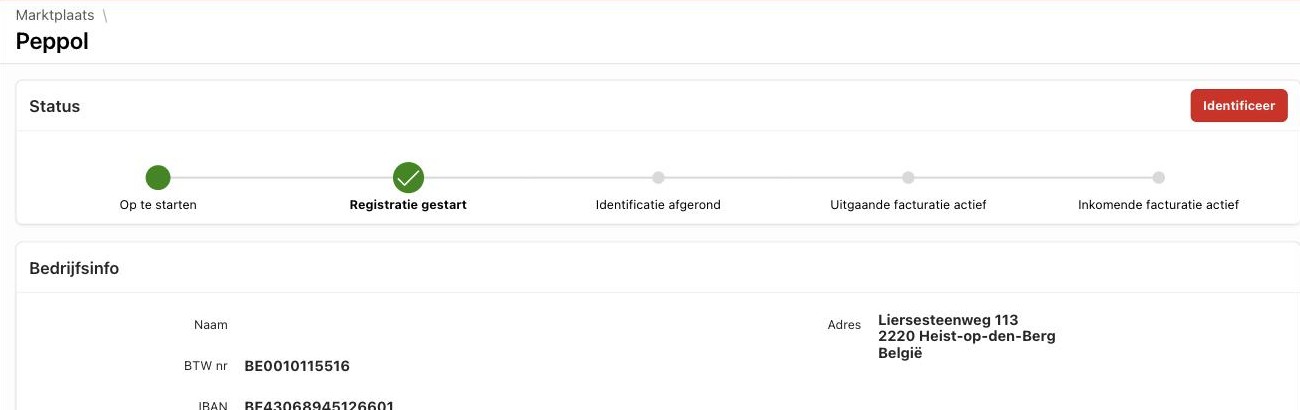
Step by step
- Switch Peppol on under Marketplace and open the card.
- Check the company info : name, VAT number, address, e-mail address and IBAN. These details will be on the network.
- Click Identify. Clubwise identifies your company on the network.
- Click Register. After registration you can send invoices via Peppol.
- If you also want to receive purchase invoices, click Activate incoming invoicing.
Under Status you see for each step whether it is completed, and under History what was sent and received via Peppol per month.
Switching off
With Deactivate incoming invoicing you only stop receiving. With Deactivate Peppol you take your company off the network. Invoices already sent or received are kept.
Tip: was your company already on Peppol through another package, for example your accountant's? Then contact us first. A company can only receive invoices through one access point.
← Previous articlePeppol: sending and receiving e-invoicesNext article →Billit: your sales invoices in your accounting
Did this answer your question?
Thanks for your feedback!